Still rebuilding the production report by hand every month?
Sales and production tracking for insurance agencies
Producify is insurance agency sales tracking software. Upload the sales reports you already get, or record a sale in a few clicks, and see what your office writes by product line, producer and source — policies and premium, month by month. It’s built for independent agencies, and for captive agents who run a team.
$0 today · then $199/month for the whole office · cancel any time · setup included
Sound familiar?
- Exporting from your agency system, then rebuilding the same spreadsheet every month.
- No quick way to see production by producer, product line and source.
- More than one office, more than one login.
Producify fixes that: Upload the reports you already get. Every office, one login.
Getting your sales in
Two ways in, and both land in the same Sales Log.
Upload the reports you already get
Upload your sales report just as it comes — Excel or CSV, several files at once. Producify matches your column headers to its fields, and only four are required: Product, Name, Written By and Written Date. Your matching is saved, so next month’s file arrives already matched.
Upload again without worry: a sale already in your log isn’t added twice, and if an issue date has changed, that sale is updated instead.
Last year’s history can come in too, so your trends and last-year comparisons start full.
How to upload your first sales report →Uploading and managing sales data →
Or record a sale by hand
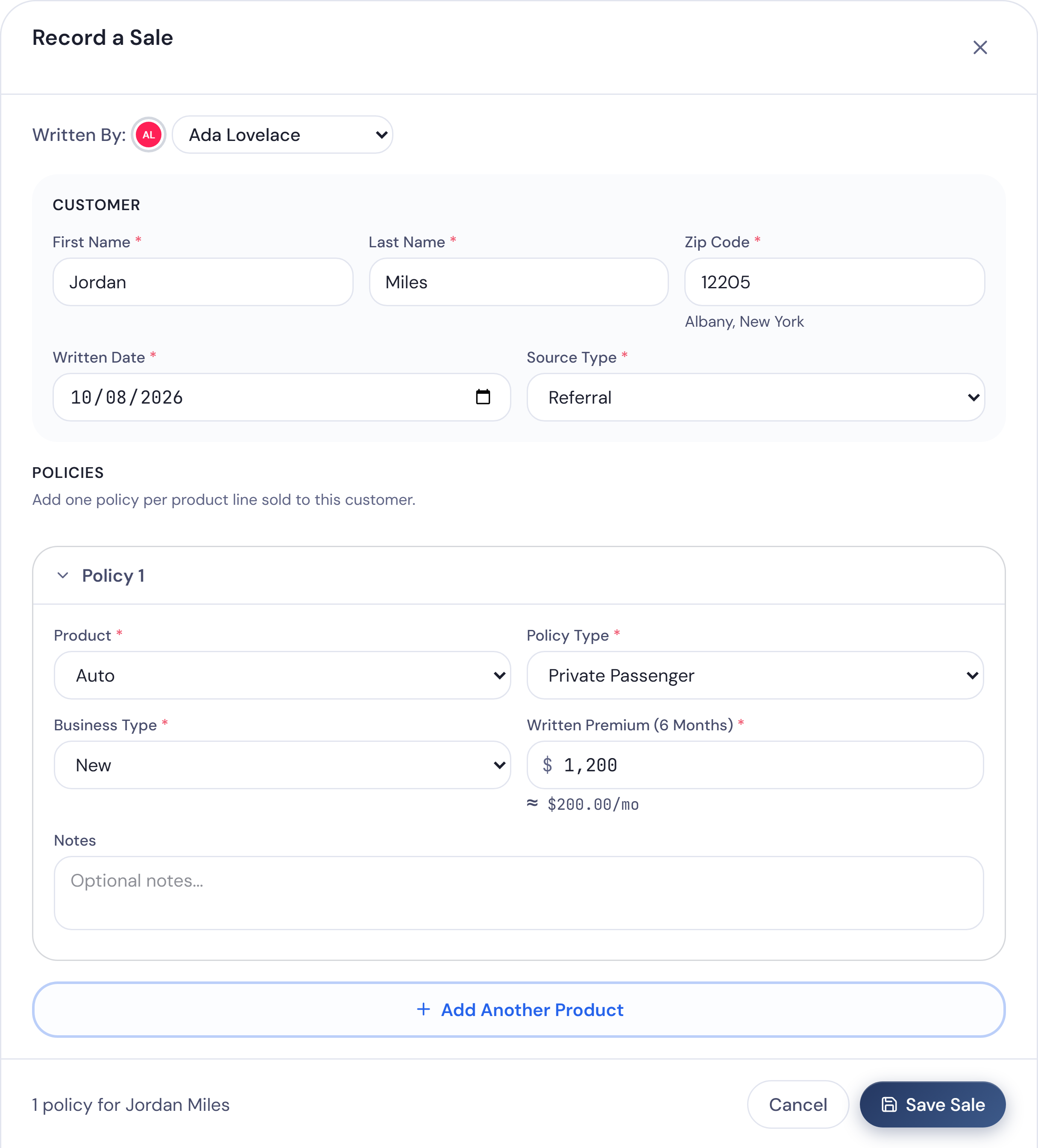
Press Record a Sale in the top bar to enter one customer’s policies without a file — up to six in one window. In Sale Config you choose which fields the form asks for and which are required, and add up to 25 fields of your own: text, number, dollar amount, date, dropdown or yes/no.
Two producers worked one sale? Split it. Each gets half the policy and half the premium on their numbers.
See your own production in one place.
30 days free, then $199/month for the whole office. Cancel any time. Setup done with you, included.
Production, cut the way you look at it
Every sale lands in the Sales Log, and the Sales page turns it into production you can read at a glance. Filter any view by date, product, policy type, team member, state, source and status — Issued, Pending, Won’t Issue or Chargeback.
Browse and filter the Sales Log →
By product line
Product Line Performance gives one row per line — Auto, Fire, Life, Health or whatever you write — with its sales, % of sales, premium and average, and a total. On Home, each line has its own card with policies and premium, for the month or the year to date.
By producer
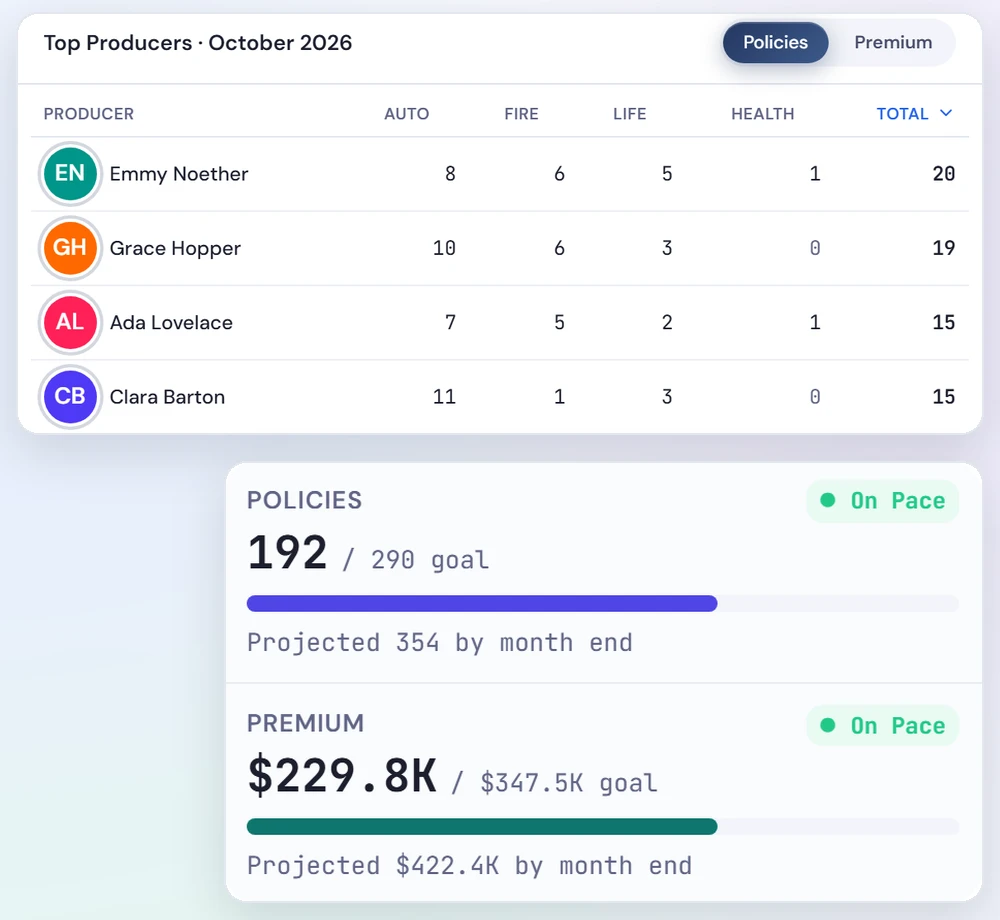
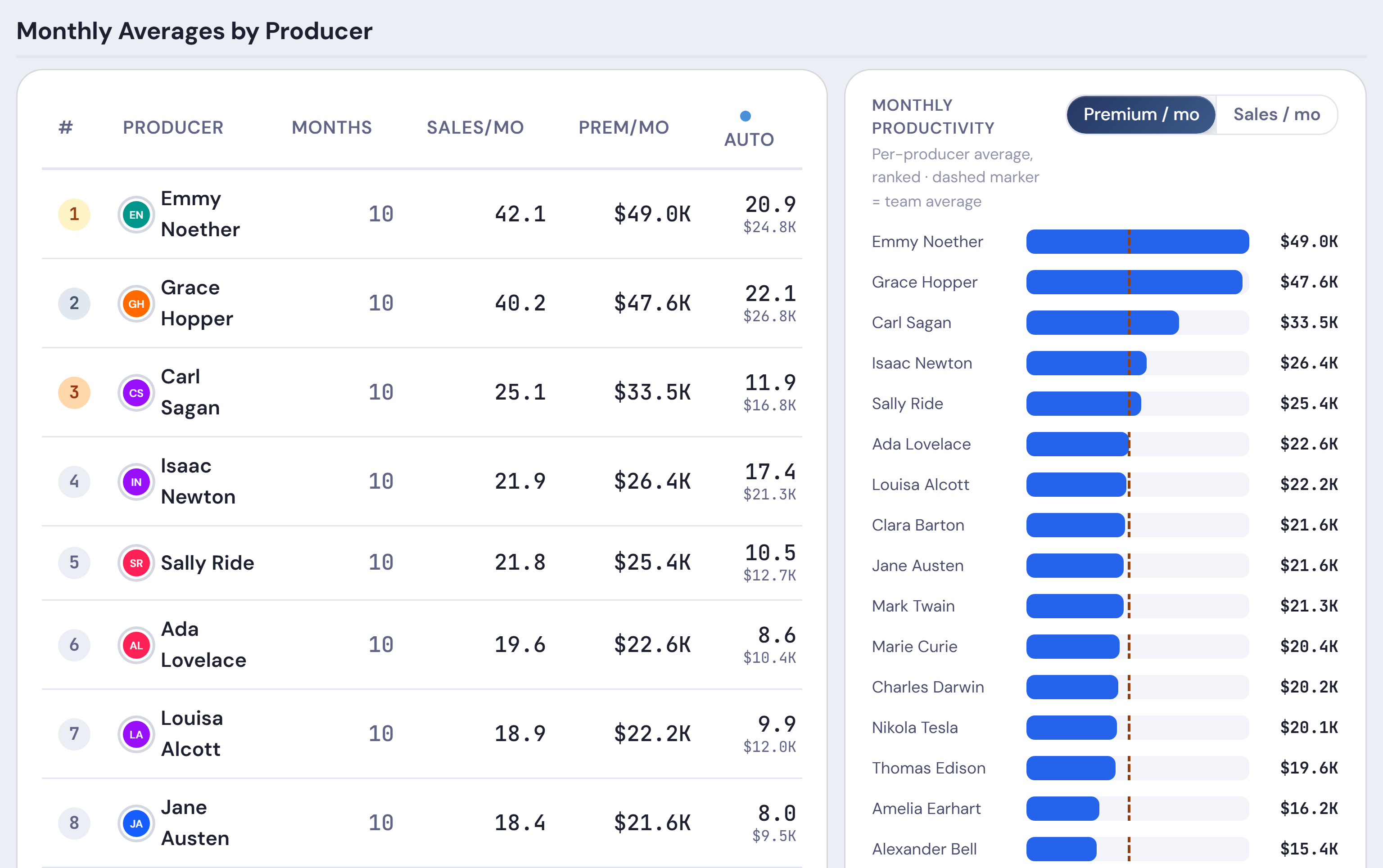
Team Performance ranks everyone by sales, with premium and a count for each product line. Pick a period longer than a month and Monthly Averages by Producer shows each person’s sales and premium per month, with a team average beneath. Open a person on the Team page and the Performance tab shows their policies, premium, households and issued rate.
By source and state
Sales by Source shows where your business comes from, and the source filter narrows every view to one source. The Locations tab charts sales over time with a line for each of up to six states, and its PDF breaks sales down by state, county and ZIP code.
Households, not just policies
Policy count tells you how much was written. Households tell you how many customers it came from. In Producify a household is one customer name, and the Lines/HH column in Team Performance shows the average number of product lines per household for each producer. Your whole book — households, policies in force and book premium — sits on the Book page, from the figures you enter each month.
Production by line of business → · Tracking producer performance → · Book of Business → · What a book of business is →
Trends and comparisons
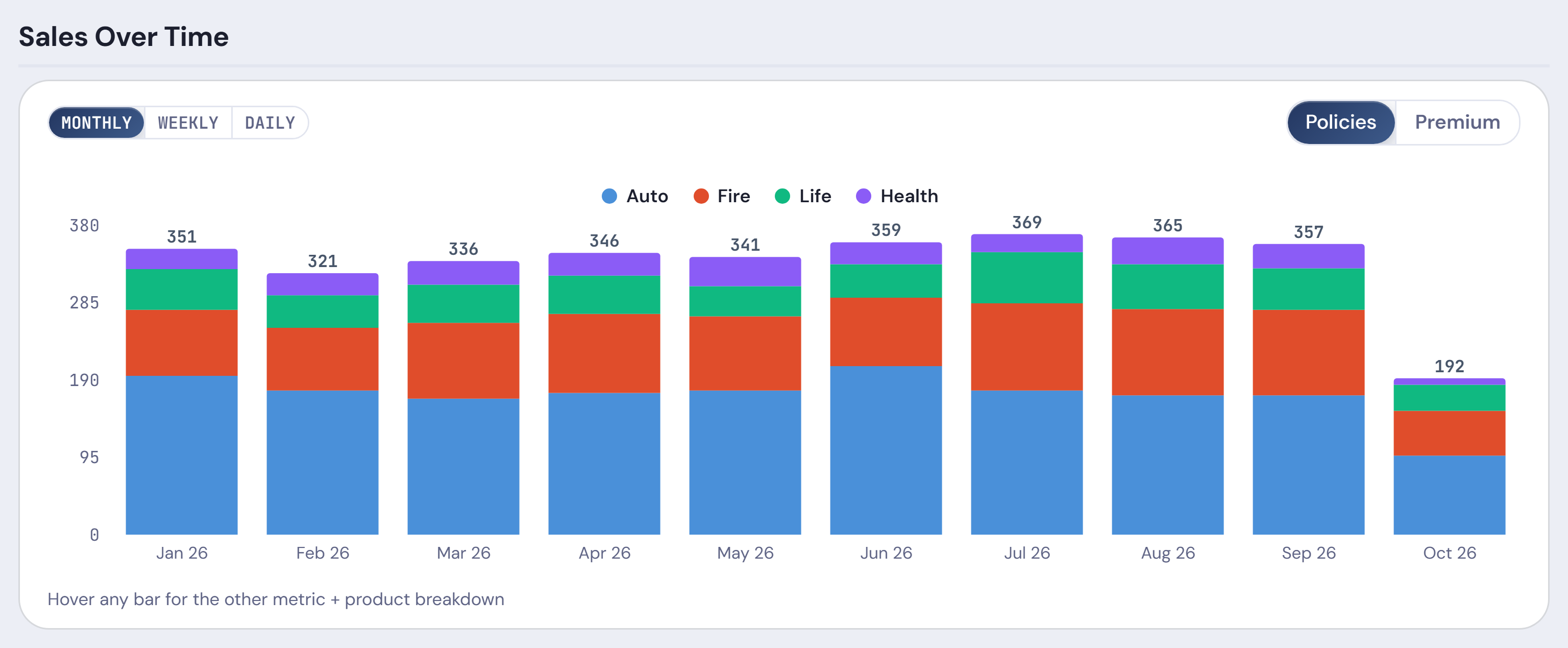
Sales Over Time shows one bar for each day, week or month, stacked by product line, in policies or premium. Set Compare to to “Previous period” or “Same period last year”: the cards at the top get a change chip, and the product and team tables get a “vs” column with the change in sales and premium. When Sales Happen shows your sales by weekday and on a calendar.
Fix a sale fast
A sale on the wrong producer usually means the name in your report doesn’t match anyone on your team. Producify matches names exactly, ignoring capitals and extra spaces. A name it doesn’t know shows under Unmapped Sales Names in Settings, and still counts in your office totals. Map it once: every sale under that spelling moves to the person, and later uploads follow.
Anything else, the owner fixes in the Sales Log. Press the pencil, change the sale — the producer included — and save. Change many rows at once, or delete a sale you don’t want. A sale already paid through Pay Team is locked until that run is undone.
How sales name mapping works →Edit and delete sales →What production credit means →
Share it
Press Snapshot on the Trends, Locations or Sales Log tab for a PDF of the sales that match your filters — totals, product mix, team performance and sales by source, or the state, county and ZIP breakdown. Bring it to the Monday meeting. The Sales Log also downloads as a spreadsheet.
Or just ask. Ask Ivy, your AI assistant, answers questions about your numbers in plain words — “Who’s behind pace this month?” — with text, tables and charts, worked out live from your office’s data. Ivy only reads; it never changes anything. The owner always has Ivy, and chooses which data it can use and who else gets it.
Stop rebuilding the production report every month.
30 days free, then $199/month for the whole office. Cancel any time. Setup done with you, included.
Goes further when you need it
Work out your team’s pay from the same sales. Pay is optional. When you’re ready, the sales you already track drive our commission tracking software: each producer’s pay worked out by your own rules and reviewed before anyone is paid, with a Payroll Summary PDF for every run. You still pay through your own payroll.
See which leads pay off. Upload your lead files too, and Producify matches leads to the sales they became, so you see which vendors turn into policies and which cost you money. Want a quick number first? Try the free lead ROI calculator.
Goals and pace. Set office and individual goals for policies, premium and quotes, by year and by month. Producify shows where the month and the year will land at today’s pace, and your projected year end. Leaderboards rank recorded production by line.
Alongside your agency management system
Keep your agency management system. Producify runs alongside it, from the reports you already get — it doesn’t connect to that system or to any carrier’s.
Producify vs. a production spreadsheet
| Spreadsheet | Producify | |
|---|---|---|
| Sales come in | Copied and pasted from each report | The report uploads as it comes; repeats aren’t added twice |
| Production by line and producer | Rebuilt by hand each month | Product Line Performance and Team Performance, refreshed on upload |
| This year vs. last | A second sheet and a formula | Compare to “Same period last year” |
| Who can change the numbers | Whoever opens the file | The owner decides who can edit or delete sales |
More on the difference: Producify vs. spreadsheets
One price for the whole agency.
Every feature. Every team member. No per-seat fees.
Plus sales tax where it applies.
First 30 days free.
Everything included, for every team member
Pay your team
- Commission plans with tiers, boosters and team bonuses
- Chargebacks and carryovers handled for you
- Weekly, every two weeks or monthly
Lead ROI
- Upload any vendor’s lead file
- Every lead matched to the sale it became
- Cost per policy and ROI by vendor and lead profile
Employee ROI
- What each person costs next to what they write and renew
- The month each new hire breaks even
- Compare producers side by side
Ask Ivy
- Ask about sales, pay, leads or goals
- Answers from your own numbers, always current
- A weekly brief every Monday
Sales tracking
- Upload your reports or add sales in the app
- By producer, product, source and state
- Split a sale between two producers
Goals and leaderboards
- Goals for the office or one person, with pace
- Track calls, quotes, reviews and more
- National, state and league leaderboards
Your team
- Permissions, page by page, person by person
- Calendar, time off and remote days
- Every office under one login
Setup and support
- Setup with us, included
- Support from people who run agencies
- Your data, downloadable any time
Add-ons: another office +$99/mo · AI+ (more Ivy usage) +$50/mo
Before you ask
How do my sales get in?
Upload the sales and lead reports you already receive, or record a sale in the app in a few clicks. Last year’s history can come in too, so your renewals and leaderboards start full.
Do I need to clean up my files before I upload them?
No. Upload your reports just as they come, even overlapping dates or the same file twice. Producify never adds a sale or lead twice, and updates any that changed.
Can I see production by product and producer?
Yes. Product Line Performance shows each line’s sales and premium, and Team Performance ranks every producer with a count for each line.
Can I compare to last year?
Yes. Set Compare to “Same period last year” or “Previous period” on the Sales page, and the cards and tables show the change in sales and premium. It isn’t offered for All Time.
How do insurance agencies track production by producer?
Most paste each month’s sales report into a spreadsheet and sort it by who wrote each sale. Sales tracking software works from the same report and keeps each producer’s policies and premium by line, month by month.
What’s the difference between a household and a policy count?
Policy count is how many policies were written. A household is one customer, however many policies they have. In Producify a household is one customer name, and Lines/HH shows the average number of product lines per household.
Does it replace my agency management system?
No. Producify runs alongside it and tracks your team, pay and lead spend.
Does it connect to my carrier’s systems?
No. Producify doesn’t connect to any carrier’s systems. You upload the sales and lead reports your office already gets, or record a sale by hand.
Can I export reports?
Yes. Snapshot on the Trends, Locations or Sales Log tab downloads a PDF of the sales that match your filters, and the Sales Log downloads as a spreadsheet.
Will my team see the office’s sales?
Yes, if you want them to. Team members start with Basic access: Home, the office’s sales, Leaderboards, the calendar and their own pay. The owner decides who can edit or delete sales.
What does it cost?
$199 a month per office, with every feature and every team member included. No per-seat fees, and setup with us is included. Each extra office is $99 a month. Your first 30 days are free: you add a card when you sign up and aren’t charged until day 31.
Is there a free trial?
Yes. Your first 30 days are free. You add a card when you sign up and aren’t charged until day 31. Cancel any time before then in Settings and you pay nothing.
How do I sign up?
Create your account, and we’ll set it up with you. Setup is included. Your first 30 days are free: you add a card when you sign up and aren’t charged until day 31.
See what your office writes, without the spreadsheet.
30 days free, then $199/month for the whole office. Cancel any time. Setup done with you, included.
Start my free 30 days →