A total tells you what happened. Pace tells you whether it’s enough.
Activity tracking, goals and pace for insurance agencies
Producify is sales activity tracking software for insurance agencies. Your office defines the activities that lead to sales (calls, quotes, follow-ups, appointments, reviews) and your team logs them from Log Activity: one press, one entry. Set goals for the office and for each person. Home shows whether you’re on pace and where the month lands if nothing changes. Built for captive and independent offices.
$0 today · then $199/month for the whole office · cancel any time · setup included
Sound familiar?
- Calls and quotes on sticky notes or not at all.
- You find out a producer is behind at the end of the month.
- Bonuses for activity worked out by hand.
Producify fixes that: Log it in seconds, see the pace every day, and pay for the work that pays.
Track the activities that lead to sales
Activities you define
Quotes come built in. Add the rest in Settings, under Activities: calls, follow-ups, appointments, reviews, whatever your office counts. Require a note on any activity when you want to know what happened, not just that it did. Then assign each activity to the people who log it. Assigning is what switches it on.
Log, correct and review
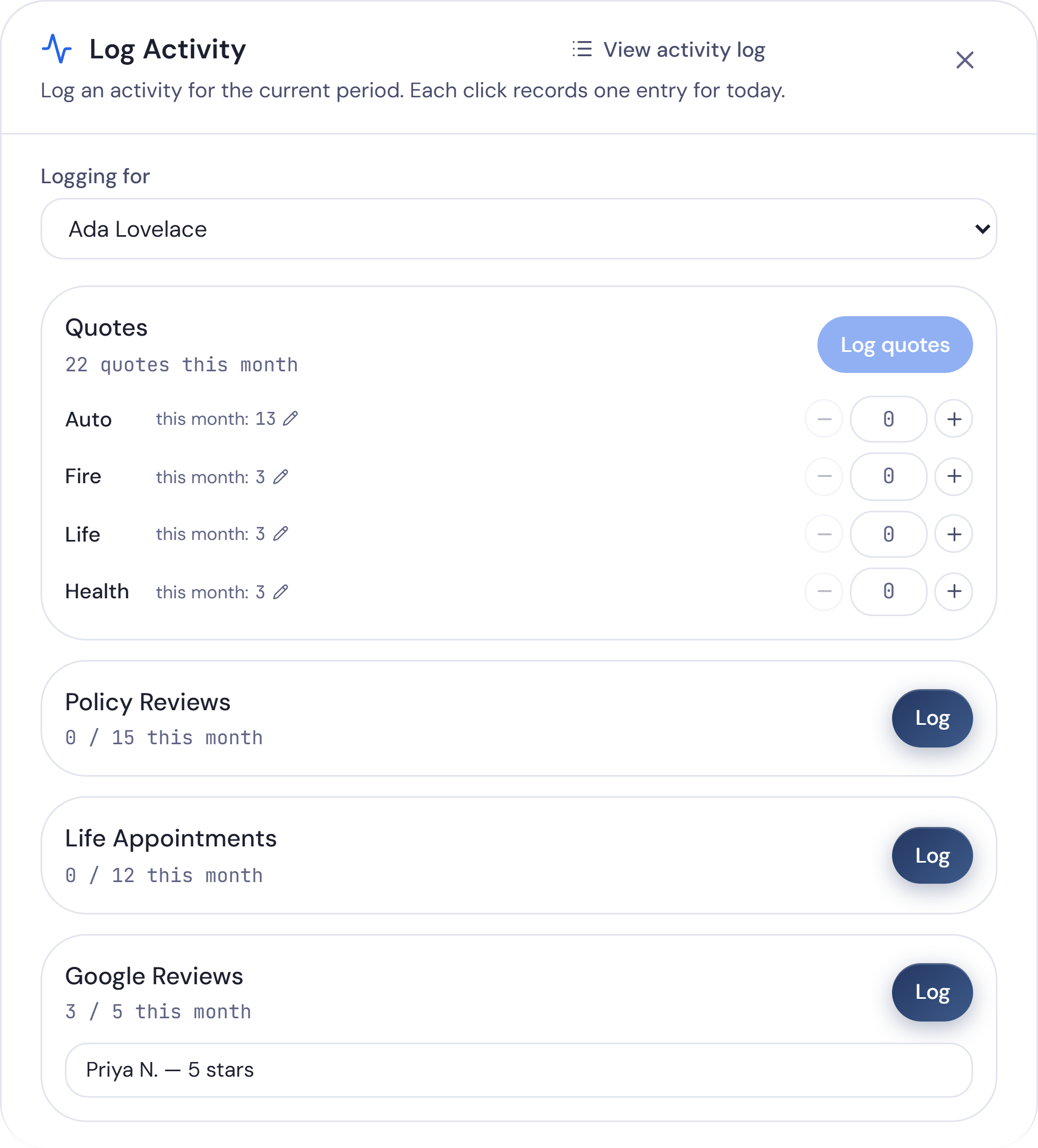
Press Log Activity in the top bar. Each press records one entry for today. Quotes go in as counts for Auto, Fire, Life and Health, because each product line quoted counts as its own quote. Everyone with a login can log, Basic members included, and the owner can log for any team member.
Made a mistake? Edit or delete your own entries; the owner can change anyone’s. Once a period is paid in Pay Team, its entries stay locked until that run is undone.
Each person’s Activity tab on the Team page shows their counts, notes and quotes beside their sales.
See the work behind every sale.
30 days free, then $199/month for the whole office. Cancel any time. Setup done with you, included.
Goals for the office and for each person
Set the year’s goals in Settings, on the Goals tab, for each product line you write: policies, premium and quotes, plus net gain or loss for the office. Producify splits each yearly number evenly across twelve months, and you can shape any month by hand. There’s no separate quarterly goal. A quarter is its three months added together.
Each person can have goals of their own, by product line, kept apart from the office’s. They don’t have to add up to it. Activities get goals too: a yearly target for each activity, with a figure for each month. As your team logs, the Log Activity window shows progress toward the month’s goal.
Not sure where to start? If your past sales are on file, Set from history suggests the year from your results, with a growth rate if you want one. Net gain goals for Auto and Fire are measured against the office numbers you type in once a month.
Set your yearly goals →Set monthly goals →Set goals for each person →Record the office’s monthly numbers →
Pace, not just totals
A total tells you what happened. Pace tells you whether it’s enough.
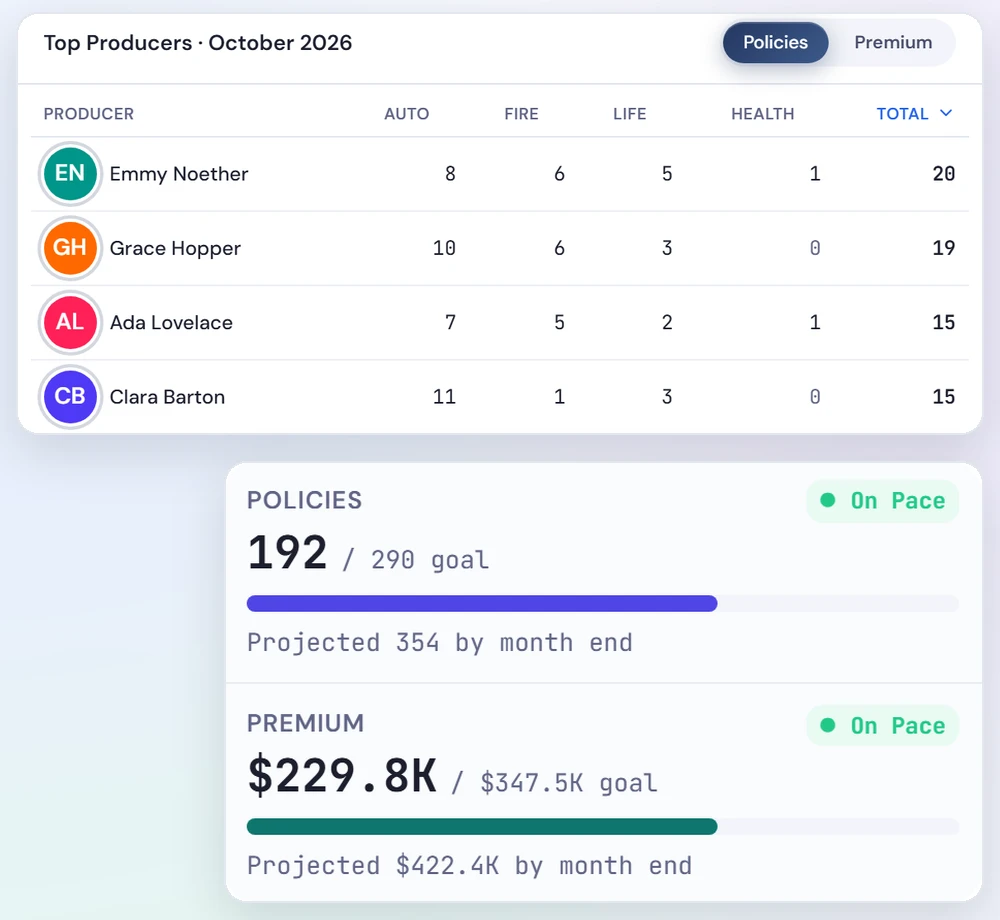
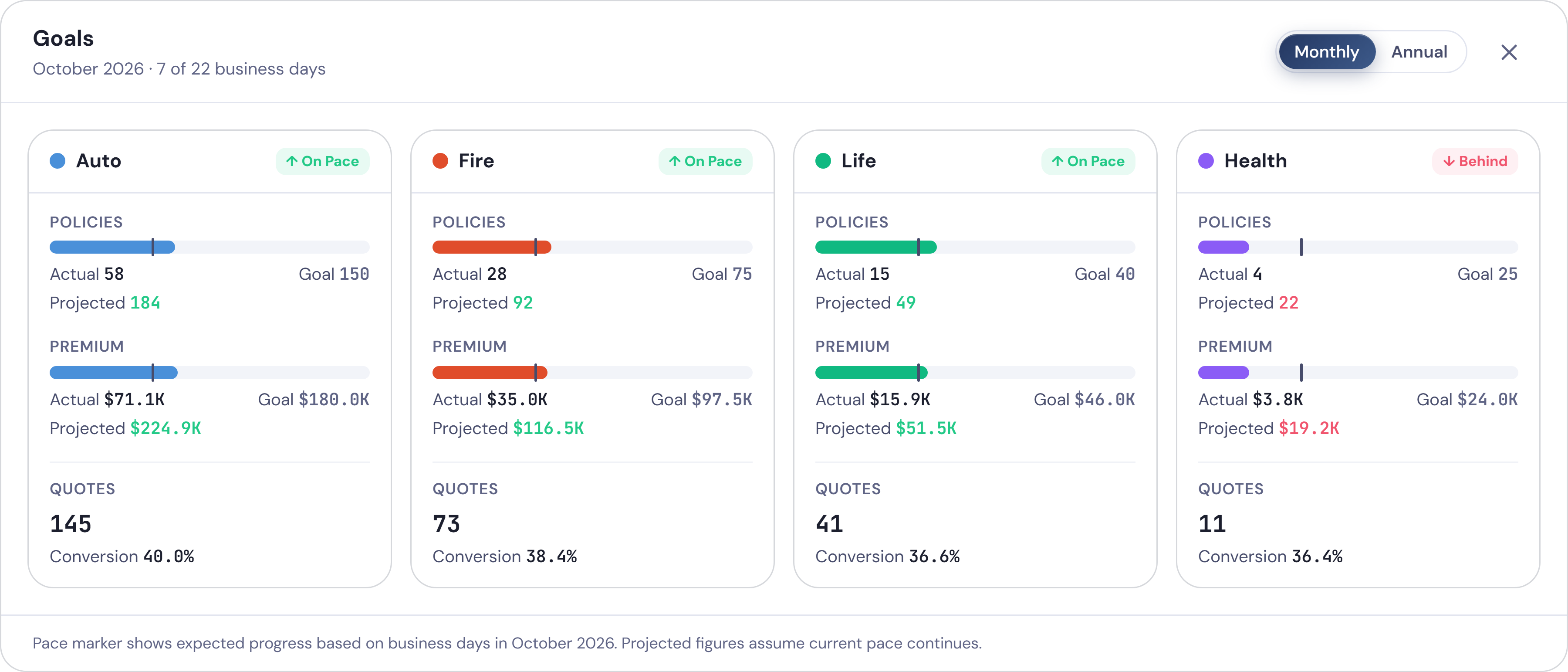
Pace compares what’s written so far with the share of the goal due by today, counted in business days, with closed days skipped. On Home, policies and premium each show Met, On Pace or Behind, and every product card does the same.
Example: a monthly goal of 100 policies, with half the month’s business days gone, puts the pace mark at 50. At 44 policies, you’re Behind.
Home also shows where the month lands if nothing changes. Early in the month, that projection blends in your office’s daily average from past months, so one slow morning doesn’t swing it. From the 15th business day, it uses this month alone.
For the year, Producify runs your results so far out at the same daily rate and shows the projected year end against the goal.
And Home picks out a win worth saying out loud, like goals met several months in a row or a selling streak of three business days or more.
Check goal pace on Home →See the wins on Home →How goal projections work →
From activity to sales: quotes, close rate and conversion
Producify divides the policies written in a period by the quotes logged for the same period and shows it as a percentage: Quote → bind on Home, Conversion on each product’s goals, and a Close rate for each person on the Team page. It counts policies, not households. A month with no quotes shows a dash, not 0%.
So when someone’s activity is high and their sales aren’t, you can see where to coach.
New to the terms? Read what close ratio is, what conversion ratio is, what a producer scorecard is and what producer capacity means, or the metrics glossary.
Pay for the work that pays
Already pay a bonus per review or appointment? Put it on the commission plan. An activity bonus can be a flat amount for each qualifying activity, a single milestone, or tiers, counted by calendar month from what your team logs. Producify works out the pay and keeps the record; you pay through your own payroll. Example: 20 reviews in a month at $10 each is $200. For rates, tiers and bonuses on sales, see our commission tracking software.

Goals, pace and the work behind them, in one place.
30 days free, then $199/month for the whole office. Cancel any time. Setup done with you, included.
Make it visible
Leaderboards rank recorded production (premium or policy count, by line) for each office and each team member, on National, State and your own leagues. They don’t rank activities, and they never show pay. Sharing is yours to set: to see other offices, you share yours, and you choose whether your people appear by name. Read more about insurance agency leaderboards.
For captive and independent offices
Captive agencies
Your licensed team members log quotes by product line and the activities you pay for, like reviews and appointments. Each one starts with Basic access (Home, the office’s sales, Leaderboards, the calendar and their own pay) and can log from day one. You set the goals, watch the pace, and decide what else they see.
Independent agencies
Producers log quotes for Auto, Fire, Life and Health, plus the activities that fill their pipeline. Goals sit by product line, for the office and each producer, with each producer’s close rate on the Team page. Run more than one office? One login covers several, each with its own team and goals.
Producify doesn’t connect to any carrier’s systems. Activities are logged in Producify.
Comparing tools? We keep dated, side-by-side comparisons, including what we don’t do yet: vs Trakability · vs FrontRunner · vs spreadsheets · all four alternatives side by side
More than activity
Pay is optional. Upload the sales and lead reports you already get and you have the rest:
Lead vendor ROI: which lead vendors turn into policies, and what each one cost. Try the free lead ROI calculator.
Employee ROI: what each hire costs, what they bring in, and the month they break even.
Ask Ivy, your AI assistant: questions about your numbers, answered from your own data.
One price for the whole agency.
Every feature. Every team member. No per-seat fees.
Plus sales tax where it applies.
First 30 days free.
Everything included, for every team member
Pay your team
- Commission plans with tiers, boosters and team bonuses
- Chargebacks and carryovers handled for you
- Weekly, every two weeks or monthly
Lead ROI
- Upload any vendor’s lead file
- Every lead matched to the sale it became
- Cost per policy and ROI by vendor and lead profile
Employee ROI
- What each person costs next to what they write and renew
- The month each new hire breaks even
- Compare producers side by side
Ask Ivy
- Ask about sales, pay, leads or goals
- Answers from your own numbers, always current
- A weekly brief every Monday
Sales tracking
- Upload your reports or add sales in the app
- By producer, product, source and state
- Split a sale between two producers
Goals and leaderboards
- Goals for the office or one person, with pace
- Track calls, quotes, reviews and more
- National, state and league leaderboards
Your team
- Permissions, page by page, person by person
- Calendar, time off and remote days
- Every office under one login
Setup and support
- Setup with us, included
- Support from people who run agencies
- Your data, downloadable any time
Add-ons: another office +$99/mo · AI+ (more Ivy usage) +$50/mo
Before you ask
What activities can I track?
Any you define. Quotes come built in. Add calls, follow-ups, appointments, reviews or anything else your office counts, and assign each one to the people who log it.
Can each person have their own goals?
Yes. Each person can have goals by product line and for their activities, kept apart from the office’s and not required to add up to it.
What is goal pace?
Pace compares what’s done so far with the share of the goal due by today, counted in business days. Home shows Met, On Pace or Behind, and where the month lands if nothing changes.
What should an insurance agency track daily?
The activities that lead to sales (calls, quotes, follow-ups, appointments and reviews) and the sales they turn into. Quotes logged beside policies written give each person’s close rate.
How do I hold team members accountable for activity?
Agree on the activities that matter, give each person a goal for them, and have the work logged as it happens. In Producify, each person’s Activity tab shows their counts, notes and quotes beside their sales.
How do I set activity goals for calls and quotes?
Add the activity in Settings, under Activities, and assign it. Then, on the Goals tab, give each activity a yearly target and a figure for each month, and set Quotes goals by product line for the office and for each person.
Can I pay a bonus for activities?
Yes. A bonus per review or appointment, say, as a flat amount per activity, a single milestone, or tiers, counted by calendar month. It sits on the commission plan.
Does it connect to the system I keep my clients in, or to my carrier?
No. Activities are logged in Producify, and it runs alongside the system you keep your clients in. Sales come from the reports your office already gets: you upload them, or record a sale by hand.
Is there a phone app?
No. Producify runs in the web browser.
Do leaderboards rank activities?
No. Leaderboards rank premium and policy count, by line.
What does it cost?
$199 a month per office, with every feature and every team member included. No per-seat fees, and setup with us is included. Each extra office is $99 a month. Your first 30 days are free: you add a card when you sign up and aren’t charged until day 31.
Is there a free trial?
Yes. Your first 30 days are free. You add a card when you sign up and aren’t charged until day 31. Cancel any time before then in Settings and you pay nothing.
How do I sign up?
Create your account, and we’ll set it up with you. Setup is included. Your first 30 days are free: you add a card when you sign up and aren’t charged until day 31.
Put the work behind every sale where you can see it.
30 days free, then $199/month for the whole office. Cancel any time. Setup done with you, included.
Start my free 30 days →