Still pasting your monthly reports into ChatGPT?
An AI assistant for insurance agencies: ask Ivy about your numbers
Ivy already has your office’s sales, pay, leads and goals. Ask in plain English. Every answer shows what she read.
$0 today · then $199/month for the whole office · cancel any time · setup included
Who’s behind pace this year?
9 of 16 producers are behind pace on policies this year.
Northwind Leads: your best-returning paid source right now
Ivy is the AI assistant inside Producify. Ask about your office’s sales and premium, pace against goals, who’s behind, lead vendor ROI, Employee ROI and team performance in plain English, or why a paycheck changed and when a new hire would pay for themselves. You get the number back, with a chart when it helps, and every answer shows what Ivy read.
Ask about your office’s numbers
Type a question the way you’d ask a colleague. Ivy answers from the numbers Producify already keeps.
Click a question
Ivy
Nine of 16 producers are behind pace on policies this year. The table shows each one’s gap.
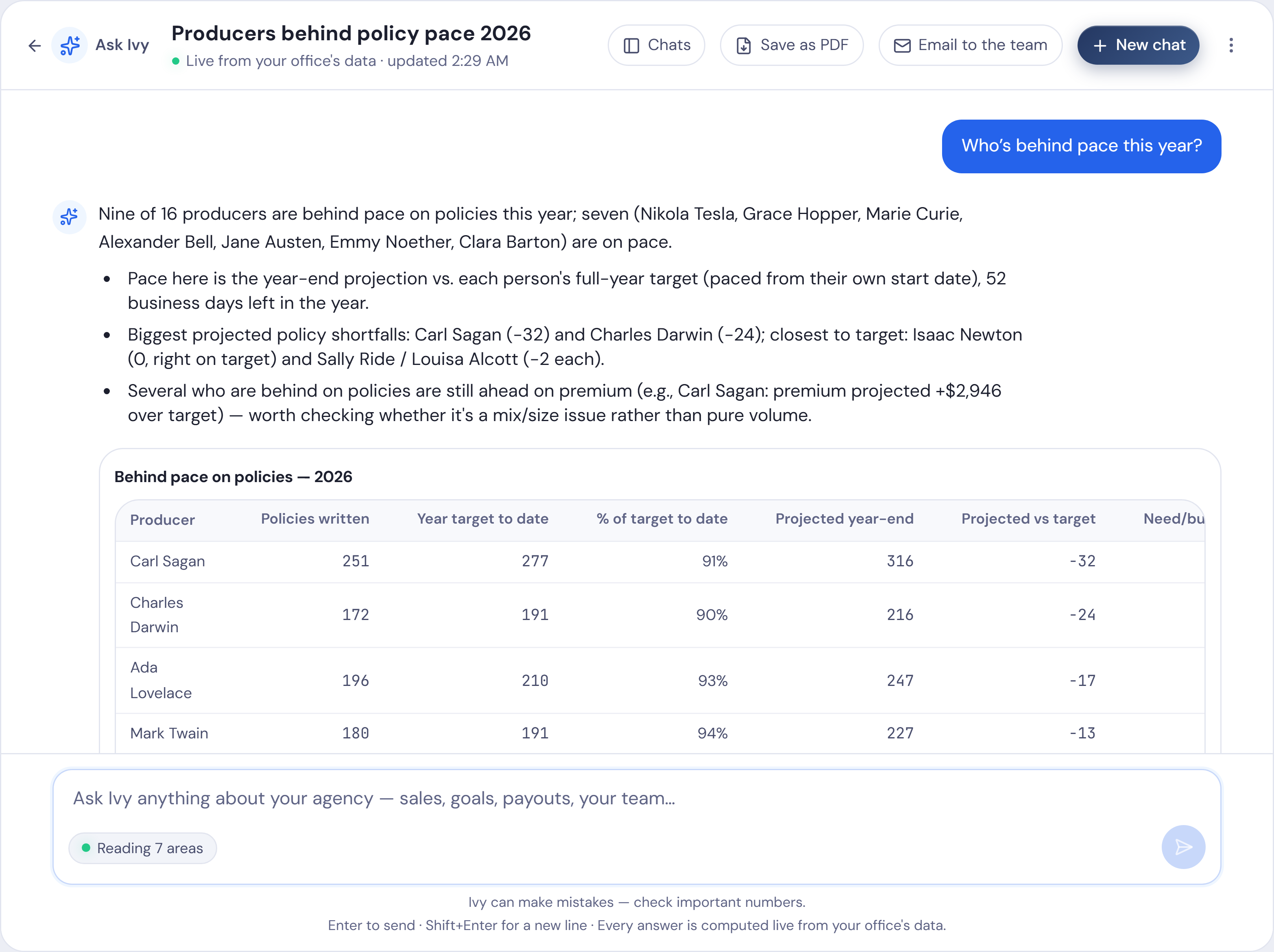
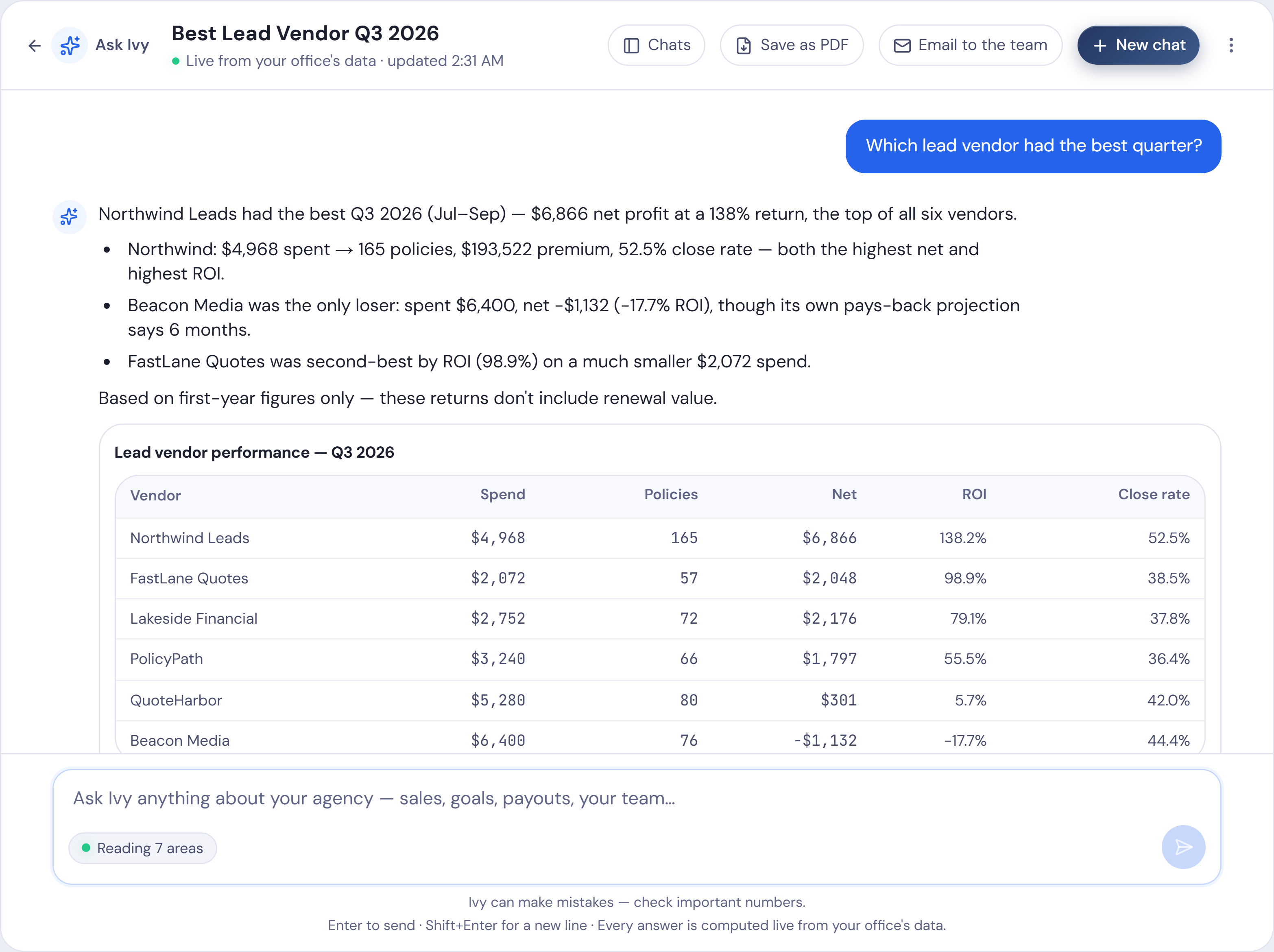
- A chart or table when it helps
- Suggested follow-ups under every answer
A new chat offers a few questions to start with:
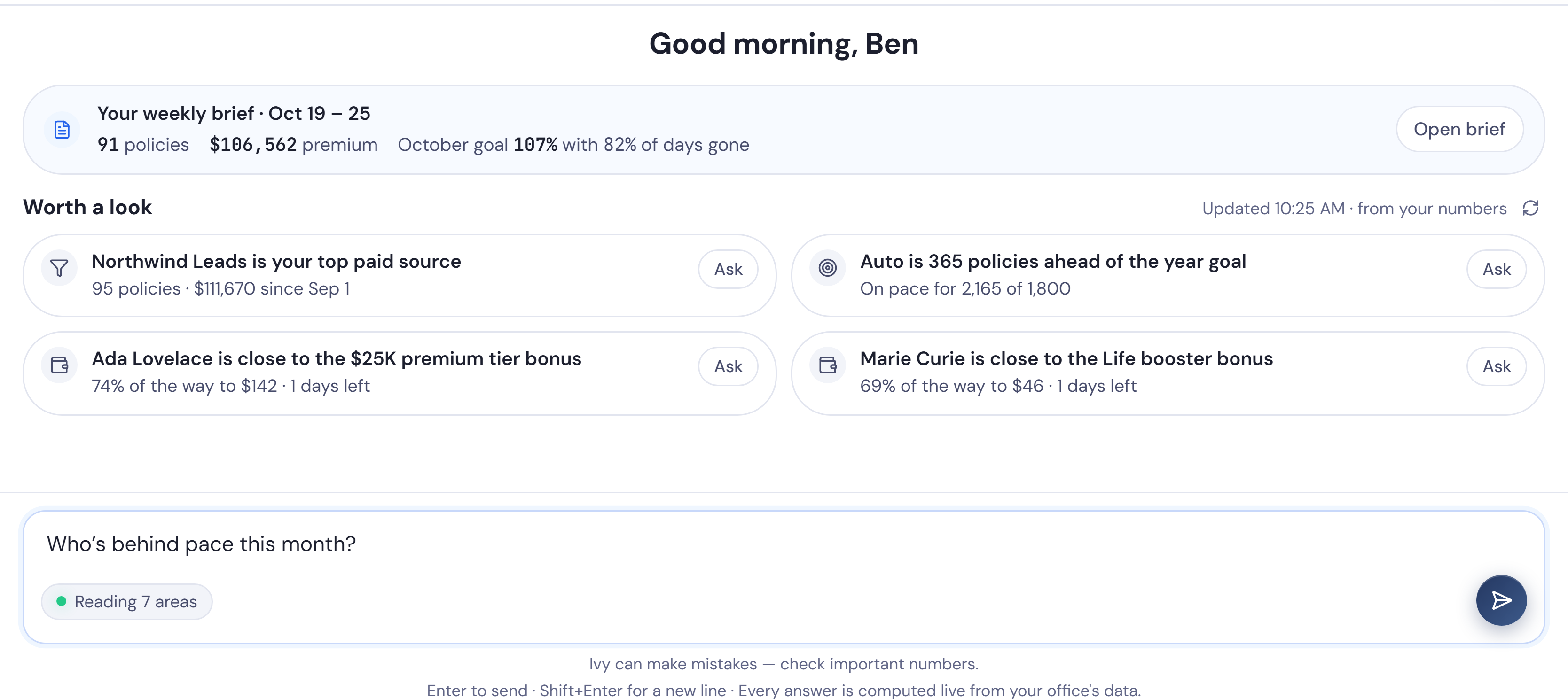
- “Who’s behind pace this month?”
- “How does this month compare to last year?”
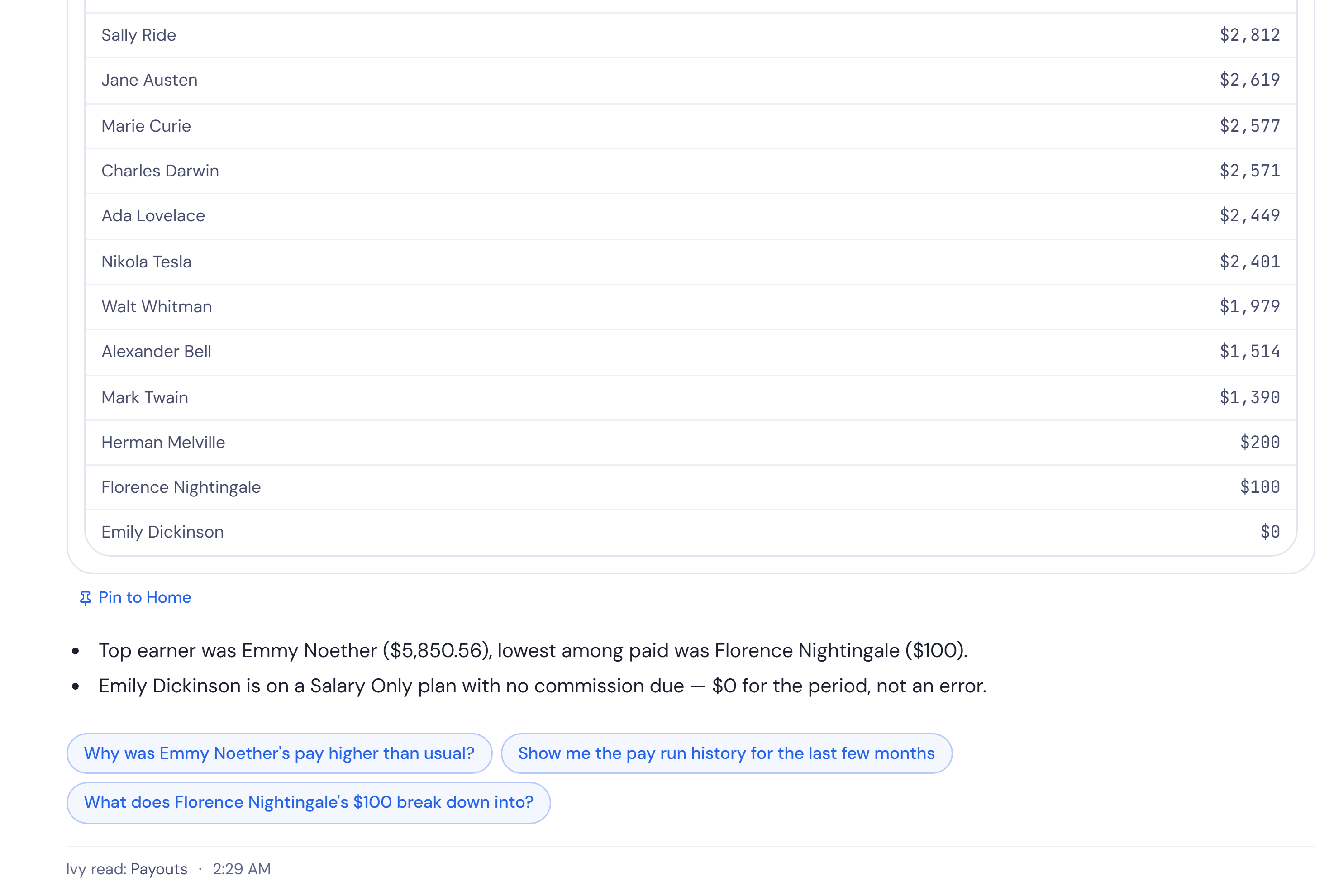
- “What will payouts be this month?”
- “Who’s close to a bonus?”
- “Which lead source is paying off?”
- “Who’s out this week?”
Read more
Type a question the way you would ask a colleague. Ivy answers from your office’s own sales, pay, leads, goals and team: the numbers Producify already keeps for you. She can look at sales and premium, trends over time, pace against your goals, who’s behind, a producer’s forecast, lead vendor ROI, Employee ROI, the team as a whole, retention and payouts.
When a picture says it faster, the answer comes with a chart, such as a monthly trend, the split by product line, or lead vendor ROI. Lists of people or vendors come back as tables you can read at a glance.
Under an answer, Ivy offers a few questions to ask next, such as a producer’s full profile or how this month compares with last. Click one, or type your own follow-up in the same chat. Ask “Who’s behind pace this month?” and the answer lists each producer with their goal, their sales so far and the gap, so you know who to talk to before the month is out.
Starting over every month?
Pasting reports into ChatGPT vs. asking Ivy
| Pasting into ChatGPT | Asking Ivy | |
|---|---|---|
| Your numbers | Exported and pasted in, every month | Already there, always up to date |
| Next month | Start over | Just ask again |
| Checking an answer | An answer you can’t check | Every answer says what Ivy read |
| Pay, leads and goals | Only what fits in the paste | Sales, pay, leads, goals and team, together |
| What it can see | Whatever you paste | Only the kinds of data you switch on |
| Sharing | Copy and paste | Save as PDF or email it to the team |
What else you can ask Ivy
Most AI for insurance agents writes emails. Ivy works from your office’s own numbers, so she can also help with the jobs below.
Why did a team member’s pay change?
Two paychecks side by side, with what moved.
What needs fixing before pay day?
Unissued sales, people with no plan, open chargebacks. Each links to its fix.
Can Ivy help me prepare a one-on-one?
Goals, product mix, close rate and pay so far, for one person.
Can Ivy build a call list?
Households by the lines they hold and their zip. Download it as a CSV.
Can Ivy write a month recap?
Production, pay, lead spend and top producers, against goal.
How are my new hires ramping?
Each new hire month by month, beside the office’s usual first months.
What would a sales contest cost?
Priced on last month’s numbers, with the rules drafted for you.
Who’s out, and what does it do to our goal?
Time off, closed days, and what each person needs per day.
What if we changed a commission rate, hired someone or moved lead spend?
Worked out from your own history.
Read the full answers
Why did a team member’s pay change? Name the person and two pay periods. Ivy sets the two paychecks side by side, with commission, bonuses, chargebacks and the sales behind each, and shows what moved.
What needs fixing before pay day? Ivy lists what to sort out before you pay the team: sales not yet marked issued, people with no commission plan, sales nobody on the team wrote, and open chargebacks. Each item links to the page that fixes it.
Can Ivy help me prepare a one-on-one? Yes. Name the person and Ivy gathers where they stand against their goals, their product mix and close rate beside the office’s, this month’s activities and their pay so far.
Can Ivy build a call list? Ask for households by the lines they hold and their zip, this month’s cancellations, or customers to win back. You can download the list as a CSV from the chat. Phone numbers aren’t part of it.
Can Ivy write a month recap? Ivy recaps a month for the office: production and premium against goal, what pay came to, lead spend against what it brought in, the top producers and sales still waiting to issue.
How are my new hires ramping? Ivy lines up new hires month by month from their start, beside the office’s typical first months, so you can see who is ahead and who is behind.
What would a sales contest cost? Pick a product line and a prize, and Ivy shows what it would have cost on last month’s numbers and drafts the rules for you.
Who’s out, and what does it do to our goal? Ivy lists approved time off, requests still waiting, the days the office is closed, and what each person still needs per business day to stay on goal.
What if we changed a commission rate, hired someone or moved lead spend? Ivy works it out from your own history: a different rate on one line, when a new hire would pay for themselves, or moving lead spend from one vendor to another.
Ask your first question about your own office.
$0 today · then $199/month for the whole office · cancel any time · setup included
Every answer shows what Ivy read
- One line under every answer says what she read, like Ivy read: Payouts
- Notes flag anything worth knowing, like a figure that’s still a projection
- Every figure links to the page it came from
Read more
Under every answer, one line says what Ivy read to get there, for example Ivy read: Goals · Sales · Team. You can see at once whether the answer came from your goals, your sales, your payouts or your leads.
Short notes under an answer point out anything in the data worth knowing before you act on it, such as a figure that is still a projection.
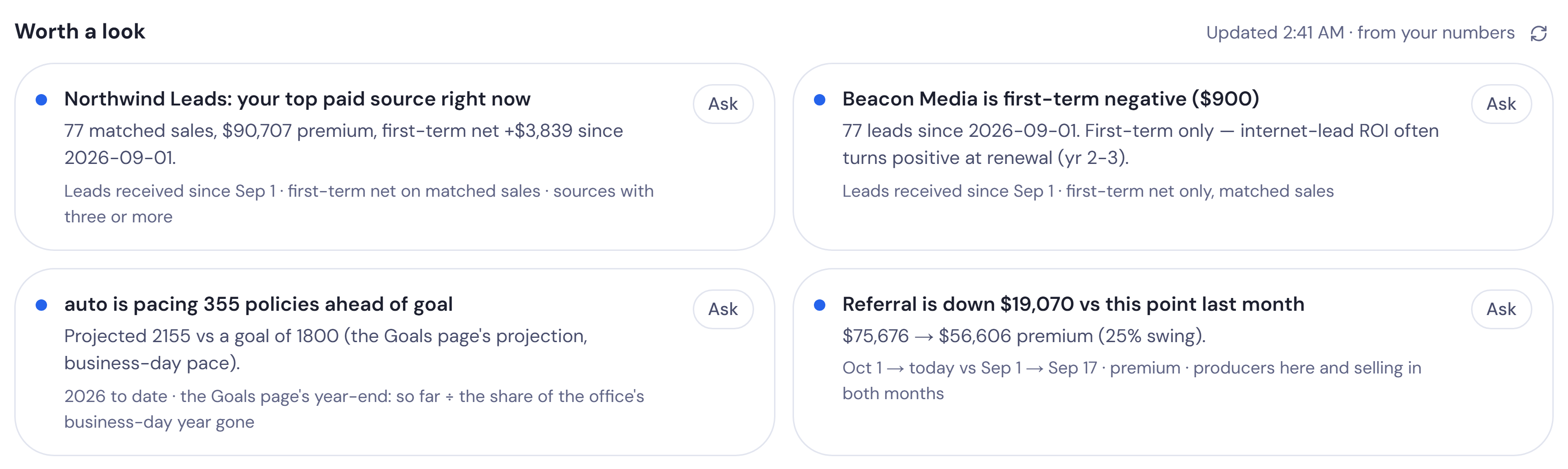
Worth a look
Ivy points out what she notices in your numbers. Click any card to ask about it.
- A lead source that is losing money
- A producer with no sales in a while
- A drop in cross-sell
- Households that hold only one line
- Someone behind pace with time off coming
- A bonus within reach
- Lapses speeding up
- The biggest movers against last month
Read more
Each week Ivy lists what she noticed in your office’s numbers. Ask about any of them in one click:
- a lead source that is losing money
- a producer with no sales in a while
- a drop in cross-sell, or households that hold only one line
- someone behind pace with time off coming
- a bonus within reach
- lapses speeding up
- the biggest movers against last month
The cards come from the same numbers as the rest of Producify, so they change when your sales, leads and goals do.
A weekly brief every Monday morning
It’s waiting in Ask Ivy when you log in.
- Production, pace, the movers, producer goals and cross-sell targets
- Reply to it like any chat, and Ivy answers in the same thread
- In the app every Monday morning
Want an email instead? That’s what the digest emails are for.
Read more
Every Monday morning a weekly brief is ready in the app. It sits at the top of the owner’s chat list, and the notification bell says it is there. It covers the week just gone: production, pace, the movers, producer goals and cross-sell targets.
Because the brief is a chat, you can reply to it: ask about any producer, line or number it names, and Ivy answers in the same thread. The brief is not emailed. It stays in the app, where you can ask Ivy about anything in it. For an email in your inbox, use the digest emails.

76 policies · $90,253 premium
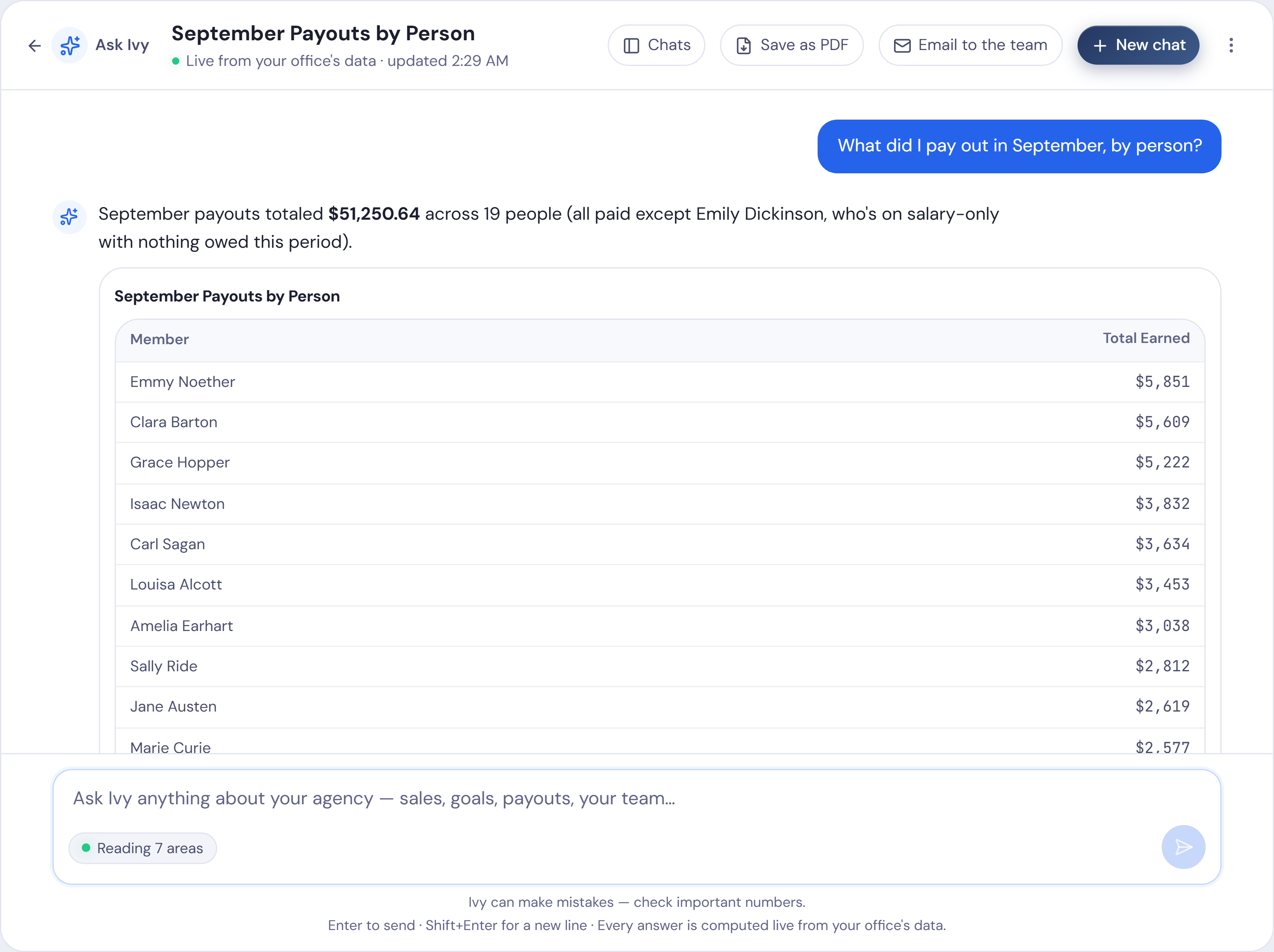
Save a chat as a PDF or email it to your team
- Save as PDF: the whole chat, charts included
- Email to the team: choose who gets it and add a note
You choose what Ivy can see
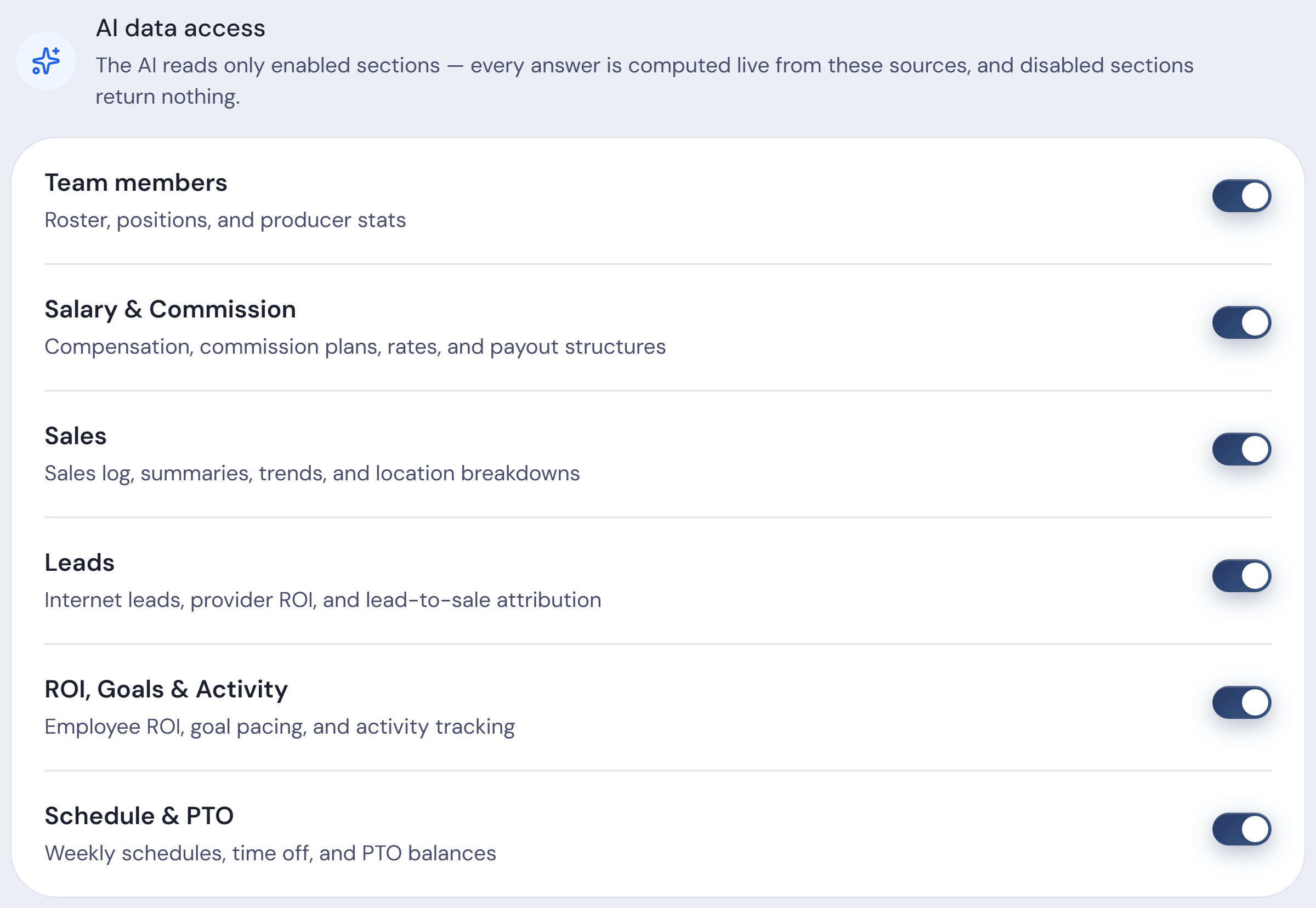
You choose what Ivy can read, with one switch for each kind of data:
- Team members
- Salary & Commission
- Sales
- Leads
- ROI, Goals & Activity
- Schedule & PTO
- Policy Activity, where your office has it
- With a switch off, Ivy says that data isn’t enabled
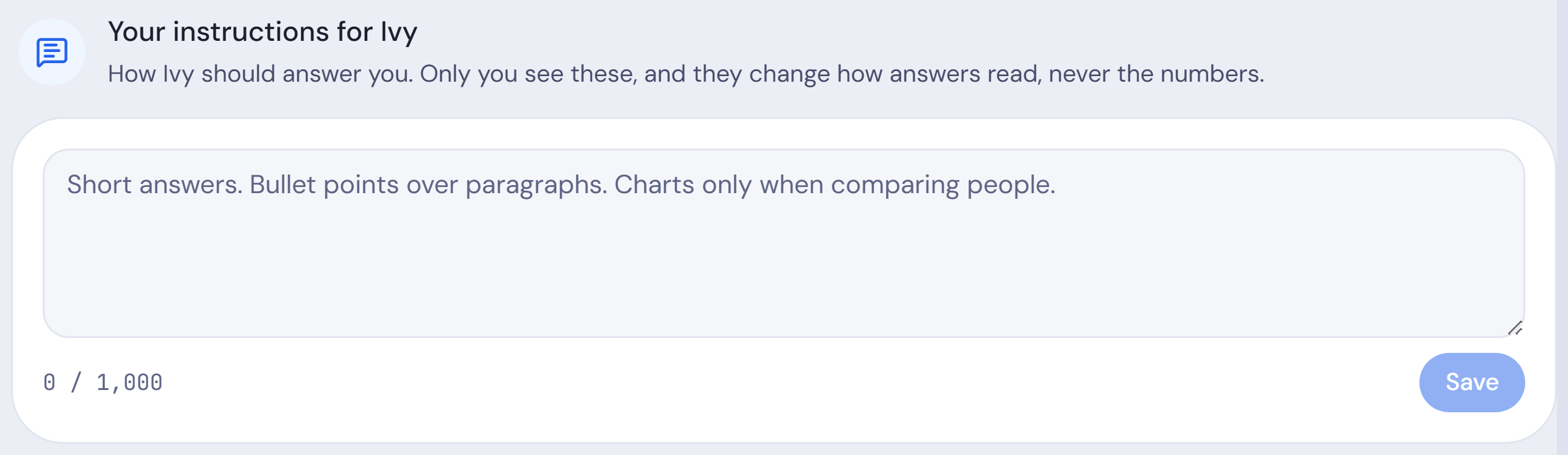
- Give her your own instructions, like “Short answers. Bullet points over paragraphs.”
- Ivy is for the owner. Team members don’t see Ask Ivy
Read more
The Ask Ivy page shows What Ivy can see, with a Change link to these switches.
Ivy answers only for the office you’re working in.
AI tools for insurance agents
AI tools for insurance agents mostly fall into two kinds: general chat tools that write and summarise, and assistants that answer questions from your own office’s numbers. The second kind needs your sales, leads and goals to work from. Ivy is the second kind: ask who is behind pace or which lead vendor costs least per policy, and she answers from your office’s data and shows what she read.
Built into Producify
Nothing extra to set up, import or log in to. Open Ask Ivy from the menu and type.
What she reads from
Read the ROI page →Read the Team page →Check goal pace on Home →Find a Settings tab →
Read more
Ivy is built into Producify. She reads the sales, pay, leads and goals your office already tracks in Producify, so her answers start the day your numbers do. There is nothing extra to import for her and no second login: open Ask Ivy from the menu and type.
- Pay: the commissions and bonuses worked out by our commission tracking software.
- Sales: every policy your office writes, in our sales tracking software.
- Activities and goals: the work behind each sale, in our activity tracking software.
- Rankings: who leads the office, on the leaderboards.
- Leads: what each vendor costs and returns. Buying internet leads? Run your numbers through our free lead ROI calculator.
One price for the whole agency.
Every feature. Every team member. No per-seat fees.
Plus sales tax where it applies.
First 30 days free.
Everything included, for every team member
Pay your team
- Commission plans with tiers, boosters and team bonuses
- Chargebacks and carryovers handled for you
- Weekly, every two weeks or monthly
Lead ROI
- Upload any vendor’s lead file
- Every lead matched to the sale it became
- Cost per policy and ROI by vendor and lead profile
Employee ROI
- What each person costs next to what they write and renew
- The month each new hire breaks even
- Compare producers side by side
Ask Ivy
- Ask about sales, pay, leads or goals
- Answers from your own numbers, always current
- A weekly brief every Monday
Sales tracking
- Upload your reports or add sales in the app
- By producer, product, source and state
- Split a sale between two producers
Goals and leaderboards
- Goals for the office or one person, with pace
- Track calls, quotes, reviews and more
- National, state and league leaderboards
Your team
- Permissions, page by page, person by person
- Calendar, time off and remote days
- Every office under one login
Setup and support
- Setup with us, included
- Support from people who run agencies
- Your data, downloadable any time
Add-ons: another office +$99/mo · AI+ (more Ivy usage) +$50/mo
Before you ask
What is Ivy?
Ivy is the AI assistant inside Producify. You ask about your office’s own numbers in plain English, and she answers from the sales, pay, leads, goals and team your office already keeps, with a chart or table when it helps.
What can I ask Ivy?
Questions about your office: sales and premium, trends, pace against goals, who’s behind, lead vendor ROI, Employee ROI, team performance, retention and payouts. A new chat offers a few to start with, such as “Who’s behind pace this month?”
Does each answer show where it came from?
Yes. Under every answer, a line says what Ivy read, for example Goals, Sales and Team. Notes point out anything worth knowing, like a figure that’s still a projection.
Is the weekly brief emailed?
No. The weekly brief is ready in the app every Monday morning, as a chat in the owner’s list, and the notification bell says so. The owner can turn it off.
Can I share an Ivy chat with my team?
Yes. The owner can save a chat as a PDF, or press Email to the team, choose who gets it and add a note.
Who chooses what Ivy can see?
The owner. Settings has one switch for each kind of office data, and with a switch off, Ivy says that data isn’t enabled instead of answering. Ivy is for the owner only; team members don’t use it.
Does Ivy write quotes, call customers or change my data?
No. Ivy only reads your numbers. When she suggests something, like a goal, it opens filled in, ready for you to save.
Can Ivy answer what-if questions?
Yes. Ask what a different commission rate on one line would have cost, when a new hire would pay for themselves, or what moving lead spend between vendors would do. Ivy works it out from your own history.
Can Ivy help me get ready for a one-on-one?
Yes. Name the person and Ivy gathers their goals, product mix and close rate beside the office’s, this month’s activities and pay so far, ready to talk through.
Can Ivy build a call list?
Yes: households by the lines they hold and their zip, recent cancellations, or customers to win back. Download it as a CSV from the chat; phone numbers aren’t included.
What does it cost?
$199 a month per office, with every feature and every team member included. No per-seat fees, and setup with us is included. Each extra office is $99 a month. Your first 30 days are free: you add a card when you sign up and aren’t charged until day 31.
Is there a free trial?
Yes. Your first 30 days are free. You add a card when you sign up and aren’t charged until day 31. Cancel any time before then in Settings and you pay nothing.
Ask Ivy about your office.
30 days free, then $199/month for the whole office. Cancel any time. Setup done with you, included.
Start my free 30 days →